Have you ever wondered how your computer knows exactly where to go when you type a website name? It feels like magic, but it is actually a very organized system. Think of the internet like a massive post office. Your computer is the mail truck, and the website is the house. But every house has many doors. The http port no is like the specific front door used for web traffic. Without this door, your computer would knock on the wall and never get inside. Most of the time, this happens behind the scenes so you never have to think about it.
In this guide, we will look at why the http port no is so important for your daily browsing. We will explain it in a way that is easy to understand, even if you are not a tech expert. Understanding how these digital ports work helps you see how the entire world stays connected. Whether you are using a phone or a laptop, you are using a port right now. Let’s dive into the details of these invisible doorways and see how they keep the internet running smoothly every single second of the day.
What Exactly is a Port Number?
To understand a http port no, you first need to know what a port is in general. Imagine a large apartment building. The street address gets you to the building, but the apartment number gets you to the right person. In the tech world, the IP address is the building address. The port number is the apartment number. Every service on a server has its own port so that data does not get mixed up.
Why Do We Use HTTP Port No 80?
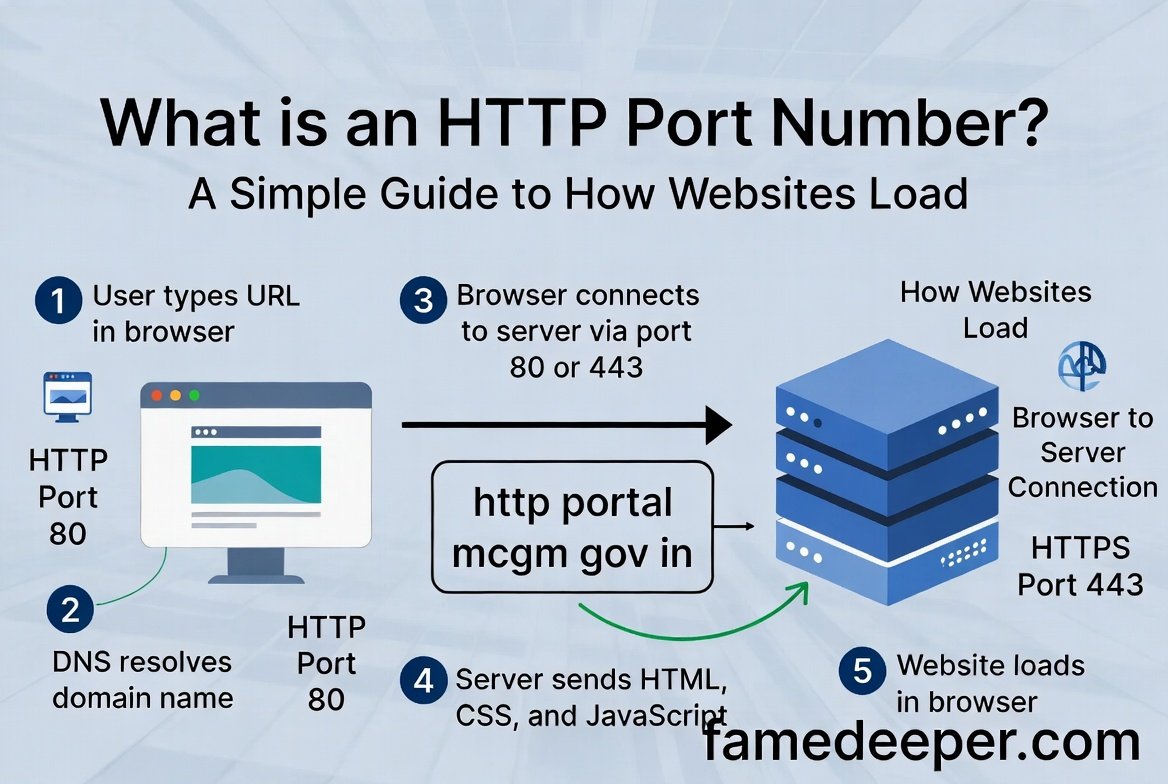
For a very long time, the world agreed that the standard http port no would be 80. This is a “well-known” port. Because everyone uses the same number, your browser knows exactly where to look. When you type “http://” at the start of a link, your computer automatically tries to connect to port 80. It makes the internet much faster because we don’t have to guess which door to use.
The Difference Between HTTP and HTTPS Ports
While the standard http port no is 80, you might have heard of HTTPS. HTTPS is the secure version of the web. It uses port 443 instead of port 80. This is like a locked, armored door instead of a regular wooden door. Most websites today prefer port 443 because it keeps your passwords and credit card numbers safe from hackers. However, port 80 is still the foundation of how the web started.
How Your Browser Finds the Port
Your web browser is very smart. When you click a link, it looks at the protocol. If it sees “http,” it immediately points its data toward the http port no 80. You do not see this in the address bar because it is hidden for a cleaner look. If you wanted to, you could actually type it out like “https://www.google.com/search?q=website.com:80,” but you don’t have to. The browser does the hard work for you.
Communication Between Servers and Clients
When your computer sends a request to a http port no, it is acting as a “client.” The “server” is the computer where the website lives. The server is constantly “listening” at port 80. It is waiting for someone to knock. When your request arrives at that specific port, the server wakes up and sends the website files back to you. This conversation happens in less than a second.
What Happens if a Port is Closed?
If the http port no on a server is closed, you will see an error message. It usually says something like “Connection Refused.” This means the “door” is locked or does not exist. This can happen if a website is down for maintenance or if a firewall is blocking the path. Firewalls act like security guards that decide which ports are allowed to stay open and which must stay shut.
Common Alternative Ports Like 8080
Sometimes, developers cannot use the standard http port no. They might be testing a new site. In these cases, they often use port 8080. It is basically a backup version of port 80. You might see this in the URL of a internal company website. It works exactly the same way, but it requires you to tell the browser specifically to look at that different number.
The Role of TCP in Port Communication
The http port no relies on something called TCP. This stands for Transmission Control Protocol. Think of TCP as the delivery person who makes sure every piece of mail arrives in the right order. When data travels to port 80, TCP checks to see if any bits were lost. If a piece of the website goes missing, TCP asks the server to send it again so the page looks perfect.
Is HTTP Port No 80 Still Safe?
Using the standard http port no 80 is fine for reading news or public blogs. However, it is not encrypted. This means that if someone is “listening” on the network, they might see what you are reading. This is why almost everyone has moved to the secure port 443. Even so, understanding port 80 is vital for anyone learning about how the digital world was built from the ground up.
How to Check Which Ports are Open
Tech experts often check the http port no status to fix website problems. They use tools like “Command Prompt” or special websites to see if a port is open. If you are ever building your own blog or website, knowing how to check your port status is a great skill. It helps you ensure that your readers can actually reach your content without any annoying technical blocks or errors.
The Future of Web Ports
As the internet grows, the way we use the http port no is evolving. We are seeing new protocols that make things even faster. However, the concept of a “port” will likely never go away. It is a simple and perfect way to organize traffic. Whether we are using smart fridges or virtual reality headsets, they all need a specific port to talk to the rest of the world.
Conclusion
Understanding the http port no is like learning the blueprint of a city. It might seem like a small detail, but it is what makes the entire web possible. By knowing that port 80 is the standard door for web traffic, you now know more than most casual internet users! It shows how organized and thoughtful the creators of the internet were when they built this system decades ago.
Next time you load a page, remember the silent work of the http port no. It is there, working hard to make sure your data finds its way home. If you found this guide helpful, feel free to share it with a friend who wants to learn more about technology. Staying curious about how things work is the best way to become a pro in the digital age!
FAQs
1. Can I change my website’s http port no?
Yes, website owners can change the port in their server settings. However, if you change it from 80, visitors will have to type the port number manually in their browser, which can be confusing for them.
2. Is port 80 the same as an IP address?
No, they are different. The IP address is like the physical address of a building, while the http port no is like the specific room number inside that building where the data needs to go.
3. Why do some people call it a “logical” port?
It is called a logical port because it is not a physical plug you can touch, like a USB port. It is a piece of software programming that helps organize data inside the computer’s memory.
4. Does every website use a port?
Yes, every single website and online service uses a port. Without a port, the computer wouldn’t know if the incoming data is for a website, an email, or a video game you are playing.
5. Can two services use the same port at the same time?
Generally, no. Only one program can listen to a specific port at a time. If two programs tried to use the http port no 80 simultaneously, they would crash or create a “port conflict” error.
6. Is the http port no 80 faster than port 443?
Port 80 can be slightly faster because it does not have to encrypt the data. However, the speed difference is so tiny that most people never notice it, and the safety of port 443 is much more important.
About the Author